Dynamic Faces MV + MZ
A downloadable RPG Maker plugin
📚 This plugin is $5 off for owners of any other paid Dynamic Series plugin license, as they have some parts in common. Use Dynamic Actors (free) to create shared rules.
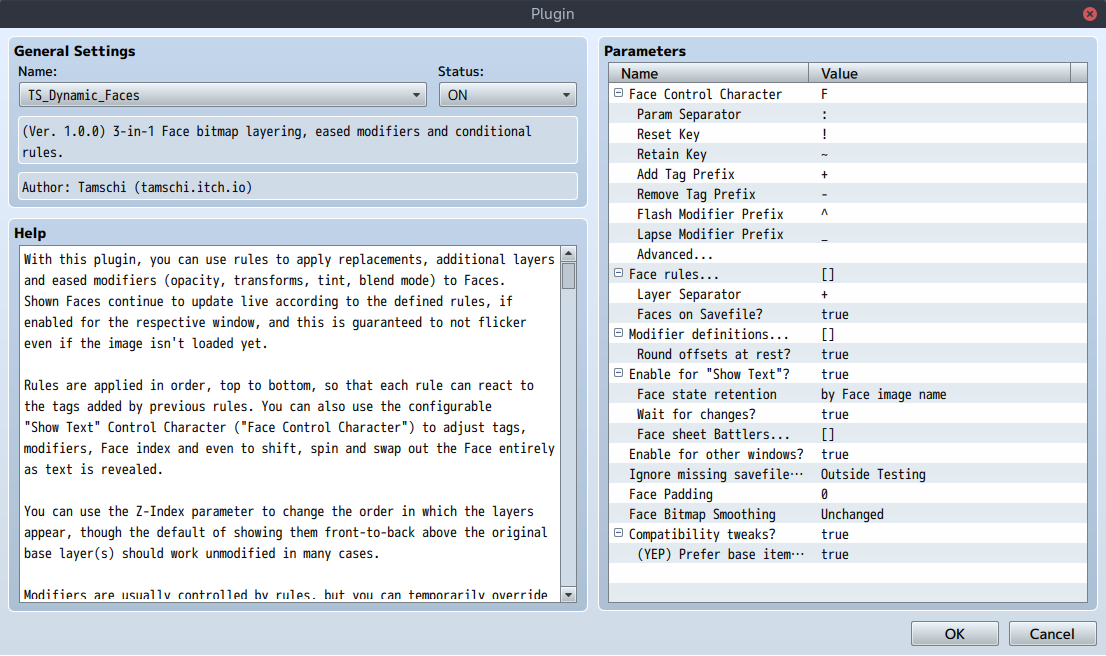
With this plugin, you can use rules to apply replacements, additional layers and eased modifiers (opacity, transforms, tint, blend mode) to Faces. Shown Faces continue to update live according to the defined rules, if enabled for the respective window, and this is guaranteed to not flicker even if the image isn't loaded yet.
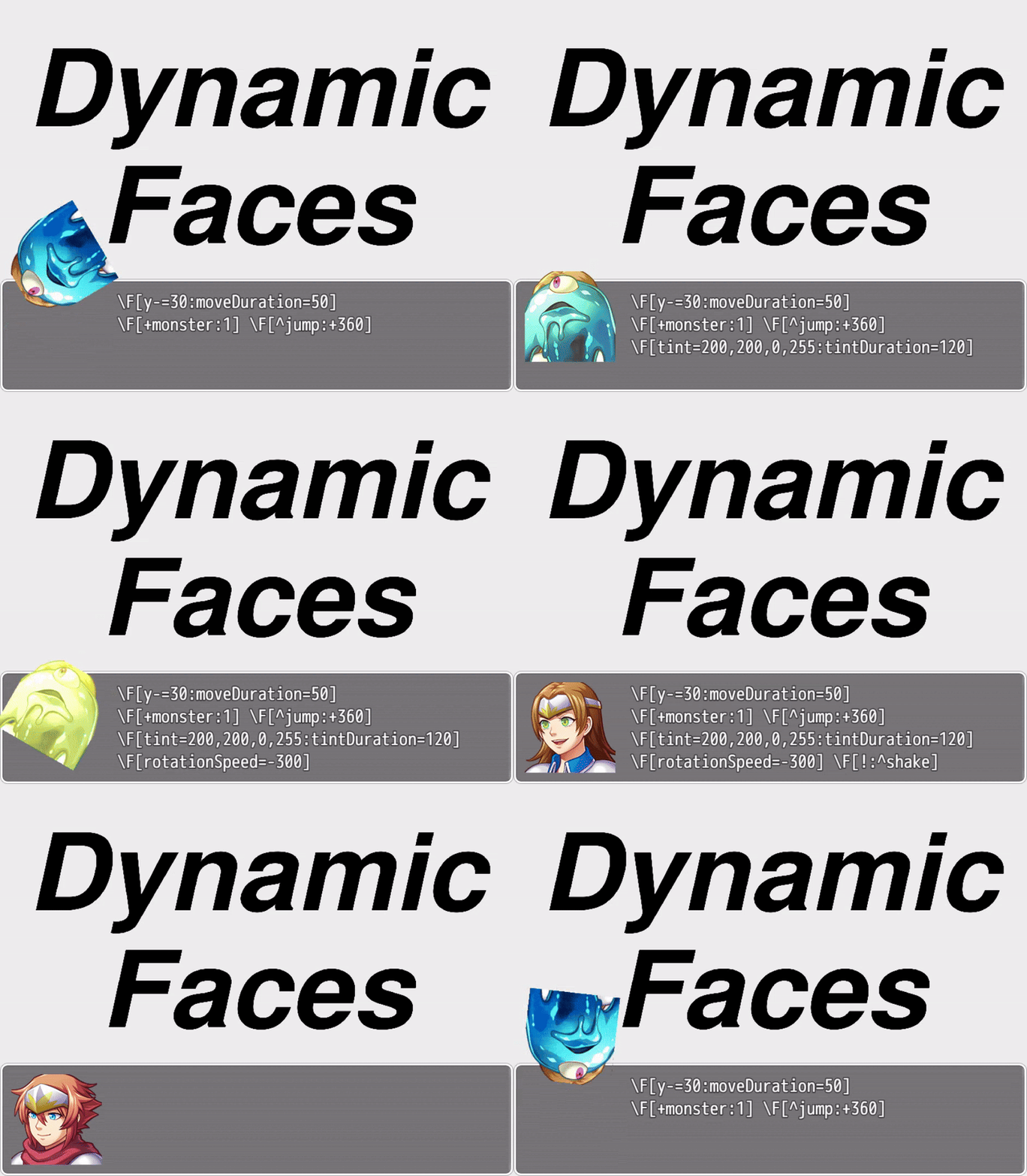
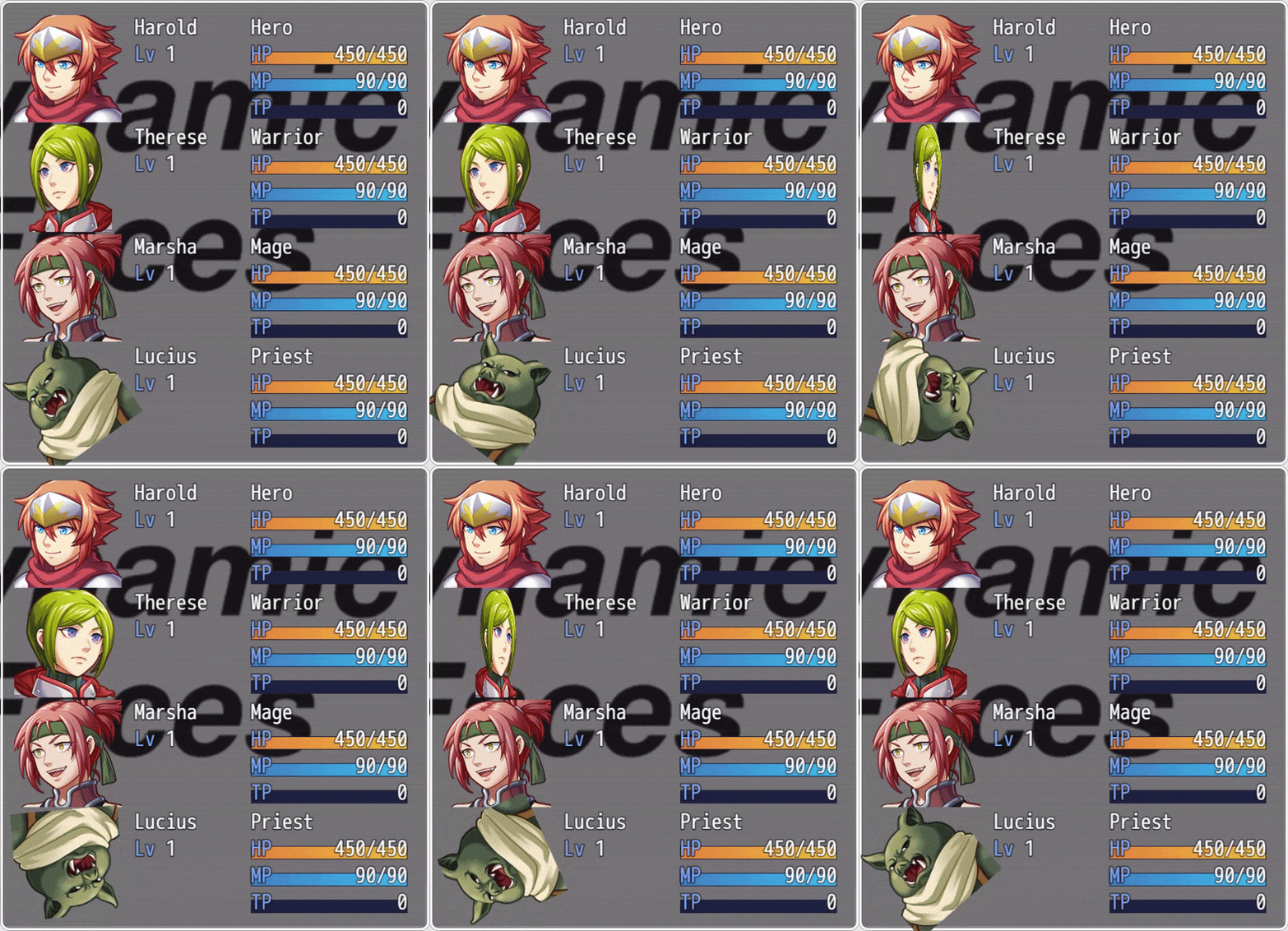
Rules are applied in order, top to bottom, so that each rule can react to the tags added by previous rules. You can also use the configurable "Show Text" Control Character ("Face Control Character") to adjust tags, modifiers, Face index and even to shift, spin and swap out the Face entirely as text is revealed.
You can use the Z-Index parameter to change the order in which the layers appear, though the default of showing them front-to-back above the original base layer(s) should work unmodified in many cases.
Modifiers are usually controlled by rules, but you can temporarily override this by flashing, lapsing or (if you specify both) "bouncing" them.
Please note that "escaping" windows' content area is an MV-only feature!
RPG Maker MZ clips rendered graphics much more strictly due to its newer PixiJS version, which seems difficult to adjust.
Before deploying for Linux on Windows, you must update MV's NW.js runtime.
Ideas
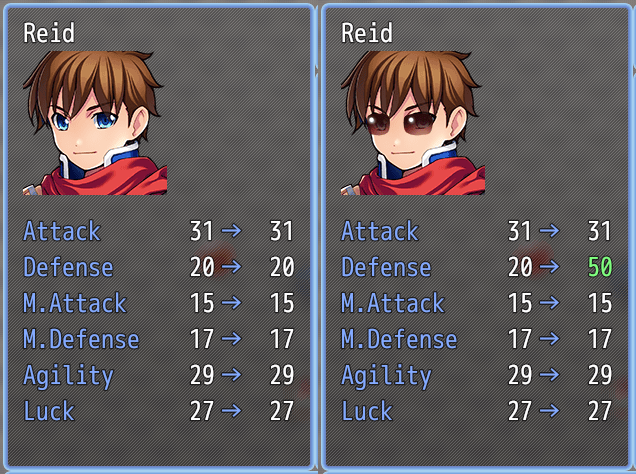
If you separate equipment into an image with the same dimensions as your character Face sheets, you can use this plugin with character conditions to have your characters wear it whenever their Face is drawn.
If you have a condition that becomes true irregularly, and enable "Face Sprites", you can use this to have blinking characters in your message windows, by adding or hiding the difference as a layer. Note that writing such a condition with a pattern that looks good can be tricky and depends on your game's individual style to some extent.
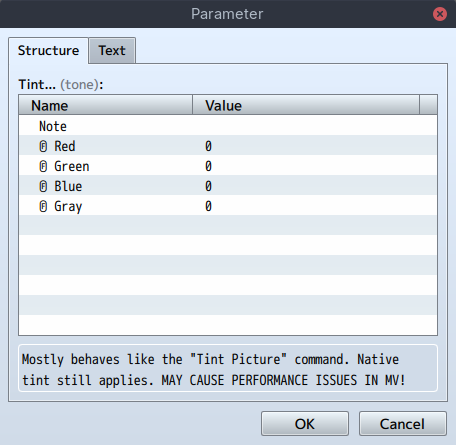
Tint modifiers can be used for dramatic effect in dialogue scenes, for example to reveal the face of a character only as they step out of shadow.
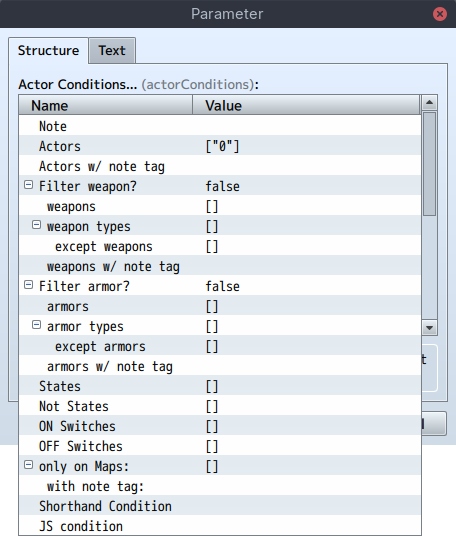
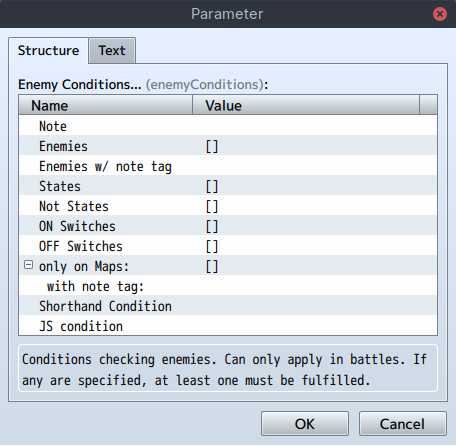
Rules can also depend on Actor and Enemy status, so you can adjust them based on what happens in battle.
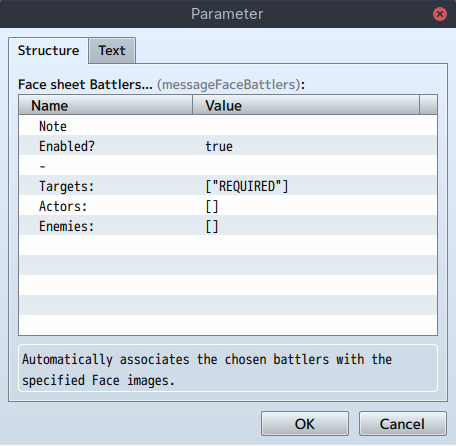
You can use battler-bound rules to show distinct battlers' status without having to set up separate rules and conditions for each.
Hints
- Use separate base layers (base Face images) for distinct Face rule targets,
as Actors aren't associated with the Face for "Show Text".
- In most cases, the ideal strategy is to use one base image per Actor and Enemy and to fill the slots with distinct expressions.
- It's fine and likely easier to still use combined sheets for characters you only want to animate via Control Character, unless they need to have distinct rules applied. If unsure, separating them is the cautious option.
- Space your z-indices a bit so that it's easier to insert something in-between layers later on.
- In case you didn't, you can also use text mode to set a rule's z-index to a number with more decimal places.
- Layers are deduplicated automatically. The topmost copy of each remains.
- If layer dimensions differ, the resulting Face sheet is sized to fit the largest along each axis, layers are top-left aligned and smaller layers along either axis are tiled to cover the entire Face sheet.
- You can use the target name placeholder %1 in added layers and modifiers to use different images and presets depending on the target.
- This way, you can for example use just one rule for a piece of armour, even if different characters and/or pose sheets are involved.
- If multiple are present initially, the top-most target layer is used.
- You can apply many modifiers to the same Face sprite at once!
- They animate independently and their components are combined as needed.
- Override
TS_Dynamic_Faces.Sprite_MessageFace.prototype.updatePositionto apply an offset afterwards, to reposition the Message Face. In RPG Maker MV, it's not constrained to the Message window's content area!
Caution
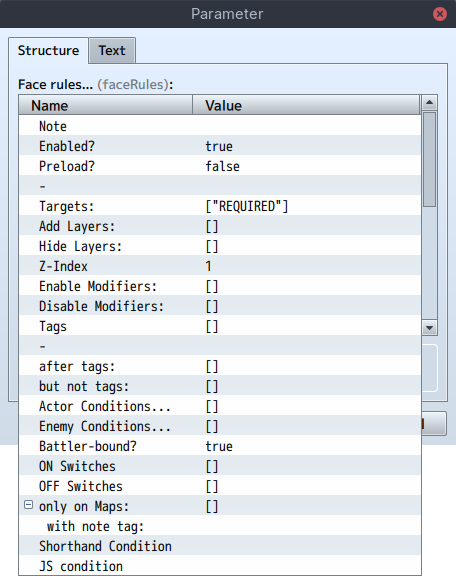
- All rules require a target to apply on! This is for optimisation purposes, so that not every rule has to be checked for each Face.
- When applying layer composition to the party shown on save slots (via
"Faces on Savefile?"), the layers and separator are "baked" into the global save file.
- Make sure NOT to change the separator or rename character layers, and keep at least the plugin enabled even if you remove all rules, in order to ensure existing saves appear correctly after updating your game.
- Note that, in RPG Maker MV specifically, ignored loading errors still may cause a delay of around 4.5 seconds when viewing the save file list. It's generally best not to rename your character layers when updating a game.
- "Targets:" and "Hide Layers:" don't automatically require files for the purpose of "Exclude unused files". You can make a rule without targets to mark files as used.
- The "Preload?" flag is quite aggressive and loads/reserves layers along with any of the rule's targets, so it shouldn't be used if a target image is used in unrelated situations or the precise timing isn't as important.
- Layers do not desync just because some aren't loaded yet.
- A non-identity "Tint..." may cause performance issues in RPG Maker MV while it is being animated (due to "In-Duration" or "Out-Duration" greater than 1 or frequent change of whether the modifier applies to a Face).
- Faces, like other spritesheets, are susceptible to texture bleed when shifted or tilted. If you notice this (as thin lines at the edges), add 1 pixel padding around each Face in the image file (increasing the canvas size accordingly in your image editor) and set the "Face Padding" parameter to 1.
- Direct Face control via "Advanced..." Control Character arguments is tricky and more error-prone compared to modifiers, and harder to adjust globally.
- It also won't blend together nicely when skipping through text, so prefer modifiers when possible.
Notes
- RGB tint transitions are not linear in RPG Maker, but rather linear in sRGB space (gamma ~2.2). As this plugin does not use custom shaders, hues may shift slightly during transitions.
- RGB tint is additive as it uses the native sRGB tint feature. Greyscale however is inversely multiplied in (not necessarily linear) HSL.
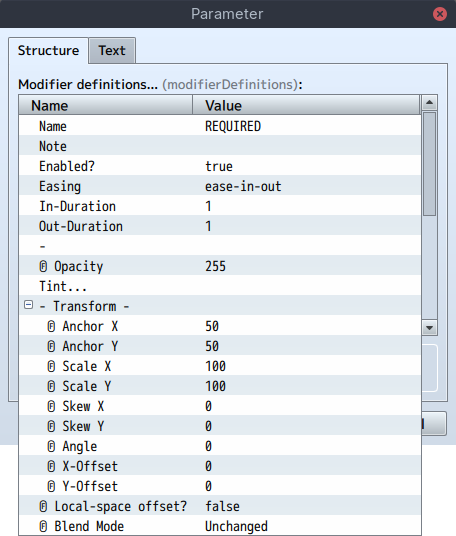
- By default, the centre of the Face sprite is used as anchor point for transform modifiers. You can change this to bottom-centre by setting "Anchor Y:" to 100.
Potential Features
These features are not currently included, but can likely be added somewhat easily on request:
- A Plugin Command equivalent to the Control Character.
- Sourcing preset tags for Actors from Dynamic Characters.
- Variables in place of numerical Control Character arguments.
Load Order
Dynamic Faces should be loaded relatively late, in order to have priority when splitting and merging Face image file names. It may have to be loaded before some other plugins that manage Faces more coarsely.
Plugin Parameters
See parameter help for further details.
Face Control Character
Determines the Face Control Character with which to control the Message Face in "Show Text" text. This defaults to F for \F[...]. Case-insensitive!
See the parameter help and the "Control Characters" section below for more information.
Face rules...
Rules to add and/or hide layers and enable and/or disable modifiers for certain targets (initial layers), based on conditions checked every frame.
Rules are indexed by target and conditions are precompiled when the game starts, so this should stay fast even with hundreds or thousands of rules overall.
See the parameter help and the JavaScript- and Shorthand Conditions sections below for more information.
Layer Separator
A character or sequence of characters used to separate layers in Face file names. This shouldn't appear in the names of Face image files you want to display.
You can erase this parameter, in which case the text (without quotes) 'TS_Dynamic_Faces__Separator' will be used.
Faces on Savefile?
When enabled, changes Game_Party.prototype.facesForSavefile to examine $gamePlayer (with followers) instead of battle members directly.
This allows Dynamic Faces to affect save slot labels (at the time the save is created). Make sure NOT to deactivate this plugin entirely and NOT to deactivate "Ignore missing savefile images?" in order to ensure save compatibility in case "Layer Separator" is changed or layer images are renamed!
Face sheet Battlers...
When enabled, changes Game_Party.prototype.facesForSavefile to examine $gamePlayer (with followers) instead of battle members directly.
Modifier definitions...
Named modifiers that can transform and tint Face sprites and override their blend mode. Please note that some operations are sensitive to the order in which they are applied, like skew, rotation and scale with distinct anchor points.
Each modifier has an associated "Easing" like "linear(0, .25 75%, 1)" or "ease-in-out", as well as an "In-Duration" and "Out-Duration" (in frames), which control the timing of the modifier's transitions. All standard CSS easing functions available in Firefox 112 are supported.
Which modifiers are active for a given Face sprite is controlled declaratively by "Face rules..." and (as temporary overrides) by the flashing and/or lapsing them via Control Character.
Ⓕ-prefixed parameters
Any parameter prefixed with "Ⓕ" is parsed as JavaScript function instead of plain value if its contents either begin with function or it contains => (without backticks). Use "Text" mode in the plugin parameters to type it in.
For this plugin, the signature is as follows:
this: ModifierDefinition(implicit andfunction-only): Parsed parameters.
t: number: Transitions from 0 to one as the modifier is applied, but can fall outside this range too.face: Game_Face: TheGame_Facethe modifier is being applied to.
For example, you can write () => Graphics.frameCount instead of an "Angle" to make a face continuously rotate clockwise by rule.
Round offsets at rest?
Advanced feature. Turn OFF to fully disable offset rounding. Defaults to ON.
Offset rounding is used to ensure transforms at rest (i.e. fully or not at all applied, without pending transition) are always aligned with the pixel grid as well as possible, to not unnecessarily blur Faces. This could otherwise occur also due to for example scaling or skewing transforms and at certain rotation angles.
(In order to avoid jitter, transitioning transforms never round offsets.)
Enable for "Show Text"?
Enables the dynamic Message Face Sprite shown on the Message window.
Face state retention
Determines which method to use to auto-reset the Message Face, so that modifier transitions are skipped when characters take turns in dialogue.
This defaults to checking for speaker name changes, unless that's not available, in which case the Face file name is used.
Automatic resets can be overridden via Control Character (see below).
Wait for changes?
Controls whether message scroll should wait for changed Face bitmaps to load.
Enable for other windows?
Whether to enable rules and modifiers for Faces drawn onto other windows (like in the menu and front battles in MZ).
Ignore missing savefile images?
Ignores ALL image loading errors in Scene_File.
In RPG Maker MV, the "Loading..." screen may still show for several seconds if a missing image is referenced by the save data.
CAUTION: Selecting 'Never' can decrease save compatibility for game updates!
Face Padding
When set to a positive number, assumes individual Faces have that many pixels of non-overlapping padding on each side (increasing the row/column thickness and with that image canvas size accordingly). Use this to prevent texture bleed from adjacent Faces if necessary.
Padding only affects frame calculations for sprites, so where Face sprites are not enabled, please use the unmodified Faces spritesheet layout.
Face Bitmap Smoothing
Optionally sets the scale mode for img/faces/ Bitmaps, once when loading them. This is most noticeable on bitmaps that are rendered larger than their dimensions, for example due to a modifier scaling them up.
Compatibility tweaks?
Tweaks for compatibility with certain other plugins.
These are generally enabled by default, as they should have either no or unnoticeable impact when the other plugin isn't present, but are optional.
JavaScript Conditions
Rules and battler conditions can contain JavaScript conditions, which should be boolean expressions.
In these expressions, target refers to the file name (without extension)
that the rule is being applied to and tags is an array of symbols and strings containing the currently applicable tags.
In actor and enemy conditions, battler refers to the Game_Actor or Game_Enemy that the condition is examining.
This means you can for example write (battler.hp / battler.mhp) <= 0.5 in a battler condition to only apply the Face rule while the selected battler is at or below 50% of their maximum HP.
(See the next section for a shorter way to write this rule!)
End-of-line comments (with //) are allowed in JS and shorthand conditions.
Shorthand Conditions
Rules and battler conditions can contain "shorthand conditions", which are a convenient way to write JavaScript conditions more concisely. For example,
here (in an actor or enemy condition) you can even write (hp / mhp) <= 0.5
for the same effect as above!
This is because, inside shorthand conditions, the following identifiers are available, in addition to the target, tags and, in battler conditions,
battler also present in JavaScript conditions:
Sw… and Var…, not following ., where … is a series of digits
These identifiers are expanded into getting the state of the numbered Switch or value of a Variable.
battler state
Similarly to Sw… and Var… above, St… can be use to check whether the battler is affected by the specified state.
Additionally, the following boolean identifiers can be used directly (and are expanded into method calls):
isDeathStateAffected, isDualWield, isAutoBattle, isGuard,
isSubstitute, isPreserveTp, isHidden, isAppeared, isDead,
isAlive, isDying, isRestricted, isConfused, isActor, isEnemy
battler buffs & debuffs
The following evaluate to the respective buff level as number, where level 0 is neutral:
mhpBuff, mmpBuff, atkBuff, defBuff, matBuff, mdfBuff, agiBuff,
lukBuff, anyBuff (= the sum of all other buff levels)
You can also get booleans according to the following pattern:
mhpIs…, mmpIs…, atkIs…, defIs…, matIs…, mdfIs…, agiIs…,
lukIs…, anyIs…
…MaxBuffAffected, …BuffAffected, …DebuffAffected,
…MaxDebuffAffected, …BuffOrDebuffAffected, …BuffExpired
battler options
Use these booleans to check a battler's options in combat:
canInput, canMove, canAttack, canGuard
battler properties
The following properties of battler can be used as if they were local variables:
hp: Hit Pointsmp: Magic Pointstp: Tactical Pointsmhp: Maximum Hit Pointsmmp: Maximum Magic Pointsatk: ATtacK powerdef: DEFense powermat: Magic ATack powermdf: Magic DeFense poweragi: AGIlityluk: LUcKhit: HIT rateeva: EVAsion ratecri: CRItical ratecev: Critical EVasion ratemev: Magic EVasion ratemrf: Magic ReFlection ratecnt: CouNTer attack ratehrg: Hp ReGeneration ratemrg: Mp ReGeneration ratetrg: Tp ReGeneration ratetgr: TarGet Rategrd: GuaRD effect raterec: RECovery effect ratepha: PHArmacologymcr: Mp Cost Ratetcr: Tp Charge Ratepdr: Physical Damage Ratemdr: Magical Damage Ratefdr: Floor Damage Rateexr: EXperience Rate
battler phase
These change as phases of the battle progress or based on player input:
isSelected, isUndecided, isInputting, isWaiting, isActing,
isChanting, isGuardWaiting
isChanting and isGuardWaiting are true while the battler isWaiting to perform a magic or guard skill, respectively.
Plugin Commands
None, as this plugin is controlled via "Show Text" Control Characters.
In a pinch, the Message Face can be controlled through Script Commands using the API. For more frequent use, please let me know and I'll add a Plugin Command that's equivalent to the Control Character.
Control Characters
(Listed as with default settings, but configurable to avoid collisions.)
\F[]
The "Face" Control Character. Within the brackets, you can place a :-
delimited set of arguments that are applied at once in automatic order:
! ("Reset")
Immediately resets the Face state, including modifiers and preset tags. Note: If a modifier newly applies by rules after all arguments are applied, the ease-in is skipped if the Face state was reset.
~ ("Retain")
Retains the Face once additionally during the next occasions where it would reset automatically. You can use this when the speaker name or spritesheet changes but you'd like to preserve Face state. Note: An automatic reset can be triggered by switching to a different (base) Face image using this Control Character, depending on the Plugin settings.
+tag ("Add Tag")
Adds the preset tag tag to the Message Face, iff not present.
-tag ("Remove Tag")
Removes the preset tag tag from the Message Face, iff present.
Note: That means that iff a tag is at once added and removed, it is toggled!
Note: The Message Face state, including preset tags, is unconditionally cleared when the Message window closes.
^modifier ("Flash Modifier")
"Flashes" the modifier modifier, causing it to fully transition in once.
_modifier ("Lapse Modifier")
"Lapses" the modifier modifier, causing it to fully transition out once.
Note: Iff a modifier is at once "flashed" and "lapsed", it is "bounced", which means it will transition fully against its current trend, then relax according to the rules!
any decimal integer
Switches the Face index to the given one. For example, 2 will switch to the *third* face in the Face spritesheet. (This waits for Face name changes that happen in the same Control Character argument set or earlier.)
anything else
Switches the Face name (target file name) to the given one. For example,
Actor2 will switch to img/faces/Actor2.png. Message scrolling will wait for the new file to be loaded, in this case, unless that is deactivated.
As a combined example, \F[!:Actor2:1] will reset the Face state and switch to the second face in Actor2.png. (Faces indices start at 0.)
Advanced Control Character Arguments
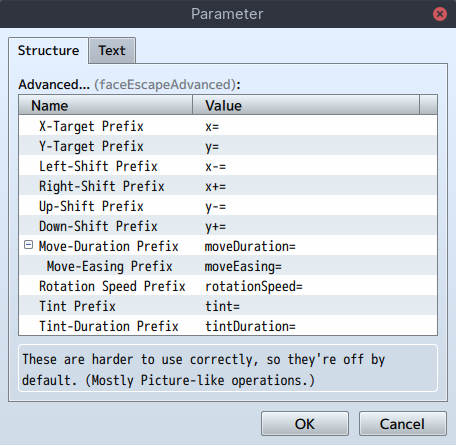
The following argument prefixes are not enabled by default. You can do so through the "Advanced..." Plugin Parameter. These prefixes control the Face in a Picture-like way.
x=, y= ("X-Target", "Y-Target")
Sets an absolute target offset for the Face to move to. This is applied before the following shifts.
x-=, x+= ("Left-Shift", "Right-Shift"), y-=, y+= ("Up-Shift", "Down-Shift")
Moves the Face by a number of pixels relative to its current or absolute target offset.
moveDuration=
Sets the duration that it will take for the Face to reach its target offset, in frames. Defaults to 0.
moveEasing=
Sets the (RPG-Maker, not CSS) easing that it will be used to move the Face.
One of Constant speed, Slow start, Slow end, Slow start and end
(without backticks). Defaults to Constant speed.
rotationSpeed=
Immediately sets the rotation speed of the Face, normally around its centre. This functions like the Picture equivalent but also accepts decimal numbers.
tint=
Changes the Face tint to the given colour (written as JS array without []). The comma-separated numbers are for red, green, blue and gray, just like in the "Tint Picture..." Command.
tintDuration=
Sets the duration that it will take to reach the target tint, in frames. Defaults to 0.
JavaScript API
This plugin unconditionally sets the global variable TS_Dynamic_Faces
when first loaded.
There, the following property and functions are available (of which all that begin with an uppercase See source code comments for more detailed information):
(Click to toggle API details.)
version
Semantic Version-compatible featureLevel, patchLevel and
releaseCandidate information.
I don't reset the patchLevel to 0 when incrementing featureLevel, so that patchLevel alone is enough to determine whether a certain fix is available in each version.
Iff releaseCandidate is not undefined, it indicates the RC number of the current version (starting at 1). This value is reset for each version that has release candidates.
This property is frozen and the object is frozen.
parameters
Parsed plugin parameters, with trailing _ and _files stripped from property names. The shorthand and JS conditions are present as functions,
here, and missing arrays and strings are added as empty. Boolean properties are normalised to true or false.
This property is frozen, but the object is mutable.
easings
A string-keyed record of easing constructors. This plugin performs CSS argument splitting before passing them to the easing constructor, so the argument is a string[][] | undefined where comma-separated arguments contain space-separated values.
(The splitting is parentheses-aware. undefined indicates no top-level
parentheses were used.)
This property is frozen, but the object is mutable.
FaceEscapeAdvanced, FaceRule, BattlerCondition, ActorCondition, EnemyCondition, ModifierDefinition, ColorTone, Game_Face, Game_MessageFace, Sprite_Face, Sprite_MessageFace
Classes that validate and evaluate rules and modifiers and manage game and visual state. It's possible for other plugins to extend these to create more advanced rules and modifiers programmatically. Please refer to the source code for more information.
These properties are frozen, but the classes are mutable.
Note: For (de)serialisation purposes, Game_*-classes are also available on window under their respective (namespaced) name.
CONSTANT
Symbol property key used to mark constant-based varyings in Ⓕ parameters.
(This influences when sprite position offsets are rounded.)
$gameMessageFace
The current main Game_MessageFace instance. (Serialised.)
This property is initialised during boot-up.
resetMessageFace()
Immediately reinitialises $gameMessageFace.
getOrInitModifierStates(face, modifiersToEnable): ModifierStates
Given a Game_Face and a set of modifier names to initially enable,
initialises and returns the Face's modifier states Map according to
parameters.modifierDefinitions.
getFreshModifierStates(face): ModifierStates
Given a Game_Face, returns its modifier states, applying Face rules as necessary to refresh them for the current Graphics.frameCount.
If necessary, initialises the states using getOrInitModifierStates.
preloadEventFaces(list)
Given a Command list, preloads Face images that are used by the Control Characters. To avoid too-high memory pressure, this function does not reserve the Faces to hold them in memory indefinitely.
retainMessageFace(n = 1)
Increases the count of schedule Message Face reset overrides by n.
obtainEscapeParam
A version of Window_Base.prototype.obtainEscapeParam that works with non-
numeric Control Character arguments.
processFaceEscape(_window: Window_Message, param: string?)
Interprets and applies the Control Character arguments.
This particular function is currently not easy to extend. Let me know if you'd like to add custom parameters and I'll refactor it into something more flexible.
changeFaceTags( faces: Game_Face[], addTags: (string | symbol)[], removeTags: (string | symbol)[], )
Removes removeTags that are present and adds addTags that aren't.
When a tag is both added and removed, it is toggled.
bumpFaceModifiers( faces: Game_Face[], modifiersToFlash: (ModifierDefinition | string)[], modifiersToLapse: (ModifierDefinition | string)[], skipToMax: boolean, )
Flashes, lapses or bounces the specified modifiers on the given Faces.
anyTransitioning( faces: Game_Face[] | Generator<Game_Face>, modifiers: (ModifierDefinition | string)[], ): boolean
Checks whether any of the specified modifiers haven't yet stabilised on the given Faces. Defaults to all modifiers and the Message Face, respectively.
applyRules(indexedRules, index, name, tags, battlers, outModifiers?): string
The function that transforms Face file names and collects enabled modifier names each frame.
indexedRules is a (frozen) readonly FaceRule[],
index is a Map<string, number[]> containing indices into indexedRules,
name is a string (returned by Game_Face.prototype.name) and
tags is a (string | symbol)[], copied from the applicable preset tags.
battlers is an Iterable<Game_Battler>, the Face's associated battlers.
You may pass an empty string[] as outModifiers. When the function returns, this Array contains the set of enabled modifier names.
instantiateEasing(cssLikeEasing: string): (t: number) => number
Instantiates an easing function according to the cssLikeEasing
string. It looks up the respective easing constructor in easings.
This is generally done up to once per Game_Face per EasingDefinition
(but usually cached).
splitCSSishValue(input): [topLevel: string, args: string[][] | undefined][]
Splits the given input string into a top-level identifier and comma separated arguments comprised of space-separated values. Parentheses-aware.
See the attached JSDoc comment in the plugin source for examples.
parseCSSNumber(string): number | undefined, parseCSSPercentage(string): number | undefined
Strict CSS value parsers. parseCSSPercentage returns percentage points divided by 100.
advanceModifiers(modifierStates, modifiersToEnable)
Unconditionally advances the given modifierStates according to
modifiersToEnable (a string[]).
References parameters.modifierDefinitions.
gatherSavedFaces(): Generator<Game_Face | null | undefined, void, void>
A generator function that returns all Game_Face instances for which preset tags and current modifier states should be saved at that time. For simplicity, this function is also allowed to yield null and undefined,
which are ignored.
By default, this function yields only the current Message Face.
oldCreateGameObjects, oldSetSpeakerName?, oldSetFaceImage, newCreateGameObjects, newSetSpeakerName?, newSetFaceImage, oldCheckToNotClose, oldDrawFace, oldLoadMessageFace, oldUpdateLoading, newCheckToNotClose, newDrawFace, newLoadMessageFace, newUpdateLoading, oldGetContents, oldClear, oldClearRect, oldName, oldOpacity, oldBlendMode, newGetContents, newClear, newClearRect, newName, newOpacity, newBlendMode, oldTone, oldUpdate, oldLoadImages?, oldRequestImages?, oldLoadFace, newTone, newUpdate, newLoadImages?, newRequestImages?, newLoadFace, oldReserveFace?, oldProcessEscapeCharacter, oldMakeSaveContents, newReserveFace?, newProcessEscapeCharacter, newMakeSaveContents, oldExtractSaveContents, oldFacesForSavefile, old_onError, oldCreateLoader?, newExtractSaveContents, newFacesForSavefile, new_onError, newCreateLoader?
Functions associated with engine hooks installed by this plugin,
where old… has the original implementation and new… this plugin's.
The hooks are installed with a small trampoline, which means that changes to these properties are effective at the respective position in the call chain.
Save Contents
This plugin creates an additional top-level key TS_Dynamic_Faces in each normal save file. The properties stored there are considered an implementation detail and should not be relied on by other plugins.
Compatibility Notes
This plugin was tested on RPG Maker MV 1.6.3 and RPG Maker MZ 1.9.1, uses only the public RPG Maker API as far as possible, and does not use any platform-specific APIs.
This plugin should be compatible with any deployment target available for RPG Maker MV and MZ, including web and most custom ones.
If you notice issues or glitches in combination with other plugins, please tell me about them, and I'll check if a compatibility tweak is feasible.
This plugin is compatible with YEP_ItemCore (independent items) and YEP_MessageCore (v1.19).
It also appears to be compatible with most or all VisuMZ plugins, but compatibility can't be fully guaranteed there.
Support
Please don't hesitate to contact me with any issues you encounter (including inconveniences) or if anything is unclear about the plugin!
You can find up-to-date contact information at https://itch.io/blog/480852/tamschis-support-contact-information-inquiries .
License Grant
(as included in the plugin file, aside from line wrapping)
A license for this plugin can be purchased at https://tamschi.itch.io/dynamic-faces .
Once you have purchased it, you may redistribute and sublicense this plugin file as part of games you create. You may not redistribute nor sublicense it separately or as part of an asset- or resource-collection.
You may modify this plugin when including it with your games, as long as the attribution above and this license grant stay intact. If you do so, you must add comments to indicate which changes you made from the original.
Purchase
In order to download this RPG Maker plugin you must purchase it at or above the minimum price of $20 USD. You will get access to the following files:
Development log
- Ver. 1.3.6: Window Refresh Flicker Prevention FixMay 03, 2026
- Ver. 1.3.5: Layer Mods (stage 1)May 03, 2026
- Ver. 1.2.4: Equipment Previews and `paintOpacity`-supportApr 27, 2026
- Ver. 1.1.3: Race condition crash bug fixFeb 28, 2026
- Ver. 1.1.2: Save file fixFeb 17, 2026
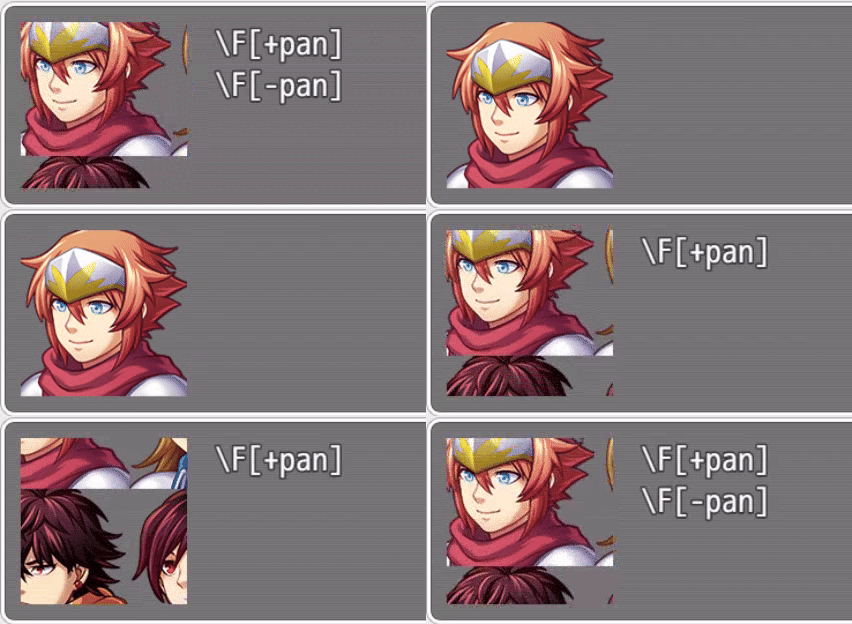
- Ver. 1.1.1: Texture Panning and (MZ) Face Size fixJan 30, 2026

Comments
Log in with itch.io to leave a comment.
I missed the Face Size customisation that MZ supports 🫠
I’ve fixed that locally, so it’ll be in patch level 1 some time later today.
This is now fixed in Ver. 1.1.1.